

Introduction
What is an API
An Application Programming Interface (API) defines the set of rules an application must use to speak to another application.
What is REST
Representational State Transfer (REST) is an architectural style that defines rules how an API should work. APIs that follow the REST architectural style are called REST APIs.
The working of the REST APIs is similar to internet browsing. The client sends a request using the API to the server, and the server returns a response.
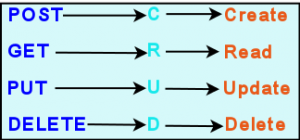
Mostly REST APIs are implemented using the Hypertext Transfer Protocol(HTTP). The following four HTTP methods are used which correspond to the CRUD tasks:
Starting a new project
Before we start, check that you have node.js installed on your computer, Open a terminal, and type the following command:
$ node -v
v18.7.0
If you have node on your computer, it will show the version installed. Else, head to https://nodejs.org/download. Download and install the LTS version for your operating system.
Initializing the project
Create a new directory, for example, myapi. Change directory to this directory and initialize a new project with npm init. Add -y to use the default settings.
$ mkdir myapi
$ cd myapi
$ npm init -y
This initializes a node project and creates a package.json file in the directory. This file contains metadata about your project and looks like this:
{
  "name": "myapi",
  "version": "1.0.0",
  "description": "",
  "main": "index.js",
  "scripts": {
    "test": "echo \"Error: no test specified\" && exit 1",
  },
  "keywords": [],
  "author": "",
  "license": "ISC",
}
This includes index.js as the main file of your project by default. Also includes a scripts section, in which you can add start alias for “node index.js”. This enables you to start the application using the npm command.
{
  "name": "myapi",
  "version": "1.0.0",
  "description": "",
  "main": "index.js",
  "scripts": {
    "test": "echo \"Error: no test specified\" && exit 1",
    "start": "node index.js"
  },
  "keywords": [],
  "author": "",
  "license": "ISC",
}
To run the application you can now use the following command:
$ npm startInstalling Express
Express is a web applications framework. You can use it to create a web server in node environment. Install it using the npm command:
$ npm i expressThis installs express and its dependencies in node_modules directory. Also creates package-lock.json file which keeps track of the dependencies, their names and version numbers.
Creating an Endpoint
Create a new file index.js, and add the following line to import Express:
const express = require('express');Using express() top level function create an Express web server and store a reference to it in an app object:
const app = express();The app object has methods like get(), post(), app.put() for routing HTTP requests. Each of these methods takes two arguments, the path and a callback function. Whenever a request is received on the specified path, the given callback is executed.
As in this example, using the get() method, which corresponds to the HTTP GET method, you can create an endpoint for ‘/’, that is, the URL for the home page. So, whenever a GET request is received on this endpoint, this invokes a callback function which sends a response ‘Hello’.
Also set app to listen on port 3000.
app.get('/', function(req,res) { res.send('Hello') })app.listen(3000)
This is how the index file looks like:
const express = require('express')
const app = express()
app.get('/', function(req,res) {
res.send('Hello')
})
app.listen(3000)From a terminal window, start the application using npm start command:
$ npm start

>myapi@1.0.0 start
>node index.js
In your browser, open the URL http://localhost:3000
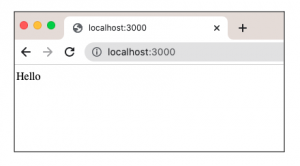
This is a fully functional API, though it doesn’t do much.
Let’s take an example of an API used to add and list user data. To keep things simple, we can store the user data in an array and not use a database.
Express Middleware
Express applications make use of a lot of middleware functions which can perform different tasks.
You need to install a middleware named body-parser for parsing data received in a POST request. Also install cors middleware. This enables a server to load resources from different origins.
$npm i body-parser cors Import and use body-parser and cors middleware:const bodyParser = require('body-parser')
const cors = require('cors')
app.use(cors())
app.use(bodyParser.urlencoded({extended: false}))
app.use(bodyParser.json())Adding User
Using post() method of the app object, you can create a /adduser endpoint. Define a callback function which saves the data received in an array, whenever a HTTP POST request is received on this endpoint,
app.post('/adduser', (req,res) => {
const user = req.body
users.push(user)
})Getting List of Users
Using the get() method, you can create a /users endpoint. Define a callback function which sends the list of users, when a HTTP GET request is received on this endpoint.
app.get('/users',(req,res) => {
res.send(users)
})Your index.js file should look like this:
const express = require('express')
const app = express()
const bodyParser = require('body-parser')
const cors = require('cors')

app.use(cors())
app.use(bodyParser.urlencoded({extended: false}))
app.use(bodyParser.json())
//Array of users
const users = []
app.get('/',(req,res)=>{
res.send("Hello")
})
app.post('/adduser', (req, res) =>{
const user = req.body
users.push(user)
res.send("user added")
})
app.get('/users',(req,res)=> {
res.json(users)
})
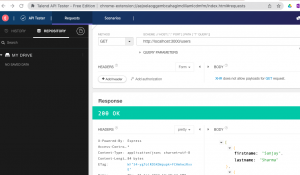
app.listen(3000)For testing this REST API, you can use Talend API testing tool. Talend is available as a free chrome extension.
To test adding a user with talend:
- Select POST method and enter the URL http://localhost:3000/adduser in scheme.
- Enter user’s firstname and lastname in the body section as follows:
{

firstname: “Ajay”,

lastname: “Gupta”

}
Click on Send, to send this POST request to the /adduser endpoint.
You should see 200 HTTP OK status in the response section. Add a few more users using the same method.
You can list users by sending a GET request to the /users endpoint in Talend. You should see a HTTP 200 OK response and the list of users in the response section.
Conclusion
As you can see, developing a RESTful API with node and express is easy. With node installed on your computer, you can install express and its accompanying middleware using the npm command. You can then write the required endpoints and test them with free API testing tools like Talend.
With this basic setup, you can now start building production ready APIs.
Recent Comments